The complete ABDM onboarding process for a healthcare provider.
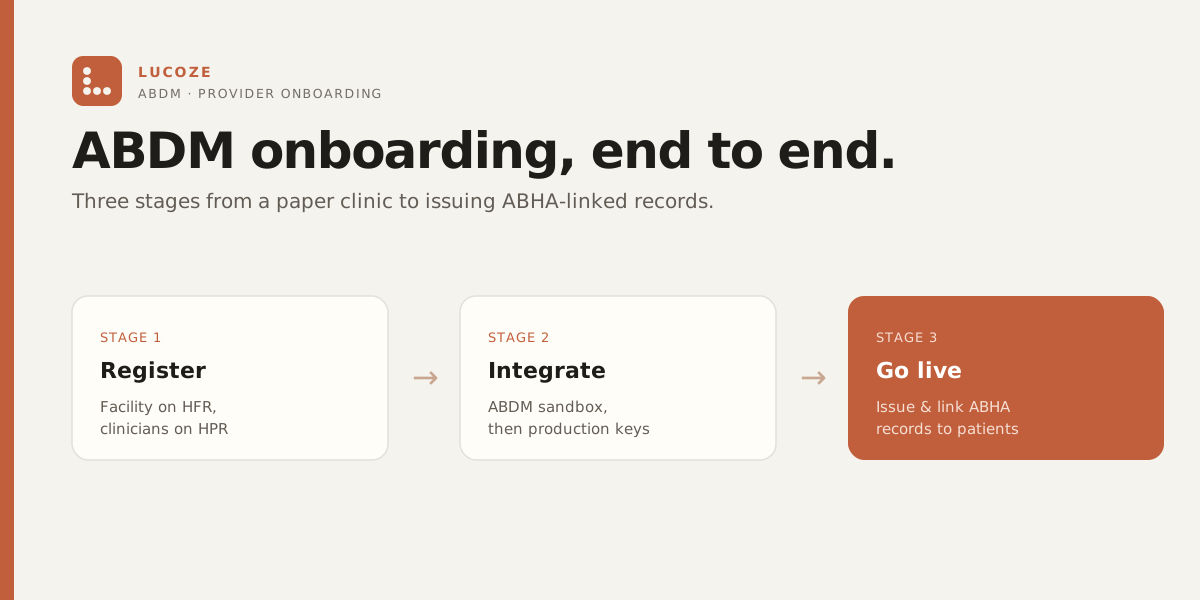
HFR for the facility, HPR for the doctors, ABHA at the front desk — the three pieces most clinics do out of order. Here is the whole path, start to live, in the sequence that actually works.
This is a practical playbook for a clinic or hospital owner, not official NHA guidance or legal advice. It reflects the process as documented in July 2026; the official ABDM portals (linked at the end) are the source of truth for current fields, documents, and incentive terms.
What does ABDM onboarding actually involve?
Most owners hear “get ABDM-ready” and picture one form. It’s three separate jobs, run by the National Health Authority (NHA), and they live on three different portals:
- HFR — the Health Facility Registry. Registers the place: your clinic, nursing home, or diagnostic centre.
- HPR — the Healthcare Professionals Registry. Registers the people: each doctor, with their verified council number.
- ABHA — the patient’s health ID, created or linked at your front desk once the first two are done.
Do them in that order and the path is clean. Do them out of order — chase ABHA linking before the facility is registered, say — and you hit walls. If you want the background on what ABDM is and why any of this matters, start with our ABDM & ABHA guide; this post is the connective piece that walks the whole onboarding, end to end.
How do you register the facility on HFR?
HFR is the row that makes your clinic real on the network — a verified facility ID that lets you issue and verify ABHA-linked records. We’ve written the full walkthrough separately, so here’s the short version: you go to facility.abdm.gov.in, sign in with a mobile OTP, enter your facility’s type, ownership, address, and the identifiers the form asks for, and submit for verification. HFR entries are verified, not self-asserted, so there’s a review step before the facility is fully live.
The two things people get wrong are picking the wrong facility type (the form branches on it) and entering an address that doesn’t match reality (verification checks it). For the exact documents, fields, and current steps, read the dedicated guide: how to register your clinic on HFR. Get the facility ID first — the doctor registrations and everything downstream reference it.
How do doctors register on HPR?
This is the piece most owners haven’t done, so it’s worth walking through. HPR is the registry of verified healthcare professionals — each doctor gets a Healthcare Professional ID tied to their medical (or other council) registration. It’s the professional-side twin of HFR: the facility is the place, the HPR ID is the person. It’s registered per doctor, not per clinic, and it’s free.
Registration happens on hpr.abdm.gov.in. The portal is the source of truth for exact screens; here’s the shape of the flow. Broadly, each doctor:
- Goes to the HPR portal and starts registration as a healthcare professional, creating their Healthcare Professional ID.
- Verifies identity — commonly via Aadhaar OTP on an Aadhaar-linked mobile — and sets a username and password.
- Selects their professional category and system of medicine (for example, modern medicine), then enters qualifications and their council registration details exactly as printed on the certificate.
- Uploads the supporting proof the form asks for — typically a photograph, degree and council certificates, and a signature — and declares where they currently practise.
- Submits the profile for verification against council records. The HPR ID becomes active once it’s approved.
A few things worth knowing before your doctors sit down to do it. The registration detail has to match the council record precisely — a mismatched number or a name spelt differently on the certificate is the usual reason a profile stalls. Each doctor does their own, with their own Aadhaar and their own council number; the clinic owner can’t register a doctor’s HPR ID as them. And the exact document list and any timelines are set by the portal and vary — don’t take a forum post (or this one) as the final word. Check hpr.abdm.gov.in for the current requirements.
How do you actually go live with ABHA?
Once the facility is on HFR and your doctors are on HPR, you’re on the map. Going live means one thing operationally: at the front desk, you start creating or linking a patient’s ABHA and connecting their visit records to it — with their consent, one visit at a time.
An ABHA (Ayushman Bharat Health Account) is the patient’s 14-digit health ID. It belongs to the patient, is usually created with just a mobile number and an OTP, and doesn’t hold records itself — it’s the index that lets records move between providers when the patient allows it. The cleanest moment to offer it is at registration, when you already have the patient’s attention and their phone in hand. We’ve written the front-desk version of this in detail: creating an ABHA at the first visit.
The order matters here. You can only link records to a patient’s ABHA from a registered facility, and ABDM-linked prescriptions lean on the doctor’s HPR ID. That’s why ABHA is step three, not step one: the facility and the professionals have to exist on the registries first, then the front-desk flow has something real to connect to.
Is there any incentive for going through all this?
Yes — the NHA runs a Digital Health Incentive Scheme (DHIS) under ABDM, which pays eligible health facilities and digital-solution providers for creating and linking digital health records to ABHA. The specifics — who qualifies, the per-record amounts, caps, and how you claim — are set by the NHA and have been revised over time. The authoritative figures live on the NHA and ABDM portals.
Our honest take: treat any incentive as a bonus, not the reason to onboard. The real reason is that state insurance and scheme workflows increasingly key off ABDM identifiers, and being registered keeps you in the digital lane instead of the paper one. The incentive is nice; being on the network is the point. For what “ABDM-ready” should actually mean when a vendor says it, see what ABDM-ready really means.
Where does Lucoze fit in all this?
Straight answer first, because this is where software vendors oversell: Lucoze does not file your HFR or HPR registration for you. Those are government registrations you complete on the NHA portals — HFR for the facility, HPR for each doctor — and no practice-management system can (or should claim to) register them on your behalf. Anyone promising to “auto-register” you with ABDM is describing something the portals don’t allow.
What Lucoze does is the part that comes after the registries — the daily operational work of being on the network:
- Create or link an ABHA right inside registration, so the front desk isn’t juggling a separate app and a paper consent form. The ask, the consent, and the linking live in the same flow as the rest of the patient’s details.
- Keep records ABDM-aligned, so once a patient consents, their records at your clinic are ready to connect on the standard rails rather than sitting in a format nothing else can read.
- Use the IDs you registered — the facility’s HFR ID and your doctors’ HPR IDs — where they belong in the record and prescription flow, so the registrations you did actually do something instead of being certificates in a drawer.
In other words: you own the registrations, Lucoze runs the day-to-day. That division is deliberate. Lucoze is your practice system, not your government registration agent — and any vendor that blurs that line is worth a second look.
What’s the whole path in one list?
- 1. Facility on HFR — register at facility.abdm.gov.in, get the verified facility ID. (walkthrough)
- 2. Each doctor on HPR — every practitioner registers at hpr.abdm.gov.in with their own council number and Aadhaar, gets a verified HPR ID.
- 3. ABHA at the front desk — start creating/linking ABHA at first visit, with consent. (walkthrough)
- 4. Wire the IDs into your software — so the facility and professional IDs flow into records and prescriptions, and linking actually happens.
- 5. Check the incentive terms — if DHIS applies to you, confirm current terms with the NHA.
None of the five is hard on its own. The mistake is doing them piecemeal, or stopping at step one and calling it done. Being in a registry only pays off when your systems use the IDs every day.
Sources
- Health Facility Registry (HFR) portal — where you register the facility and the source of truth for its current steps.
- Healthcare Professionals Registry (HPR) portal — where each doctor registers; source of truth for professional-registration steps and documents.
- ABHA — create and manage a health ID — the official ABHA portal.
- Ayushman Bharat Digital Mission (ABDM) — the framework all three registries are part of.
- National Health Authority (NHA) — the body that runs ABDM and sets the Digital Health Incentive Scheme (DHIS) terms.
Next steps
If you want to talk through where your clinic sits on this path — what you’ve registered, what’s left, and how the front-desk flow looks on your own system — reach out. No pitch attached. Or, if you’d rather just see the ABHA-at-registration flow in practice, Lucoze has a 14-day trial — no card.