Creating an ABHA at the first visit: a front-desk guide.
The flow takes a couple of minutes at registration, needs the patient's consent, and saves everyone the scramble later — here is how the front desk actually does it.
This is a practical guide for a clinic front desk, not official NHA instructions. The ABHA and ABDM portals are the source of truth for exact field names and screens.
What is an ABHA, in one line?
An ABHA — Ayushman Bharat Health Account — is a 14-digit health ID issued under ABDM, the National Health Authority’s digital-health framework. It belongs to the patient. It is usually created with just a mobile number and an OTP; Aadhaar is optional. Think of it as the patient’s health-record index, not a folder of records.
The ABHA doesn’t hold the patient’s history. It’s the key that lets records move between providers — with the patient’s consent, one visit at a time. The records stay where they were created.
That distinction matters at the desk. You are not uploading anyone’s file to a government server. You are helping the patient get an ID so their records can be linked later, if and when they say yes. Nothing about creating an ABHA moves data on its own.
Why do it at the first visit?
Registration is the one moment you already have the patient’s attention, their phone in hand, and a minute of dead time while the details go in. Bolt the ABHA step onto that and it costs almost nothing. Chase it later — over the phone, at discharge, at the next visit — and it becomes a task nobody owns.
There’s a practical payoff too. Once a patient has an ABHA and consents to link, their record at your clinic can connect to it, and future visits stop starting from a blank page. For a clinic that’s HPR- and HFR-registered, doing this at the front desk is the cleanest point in the whole journey to offer it. The ABHA the patient ends up with comes in two forms — a 14-digit number and a readable ABHA address — so note down whichever one they hand you.
What you need from the patient — and consent first
Very little, and none of it before you’ve asked. The usual ingredients:
- A working mobile number that can receive an OTP — this is the minimum.
- The patient’s name and basic details as they’d like them recorded.
- Aadhaar, only if the patient chooses to use it. It’s optional — never insist.
Before any of that, the front desk asks. Something plain works best: “Would you like me to create a free health ID for you? It lets your records connect across clinics, only when you allow it. Takes about two minutes, and it’s completely optional.” Then wait for a yes. The consent isn’t a formality you get around — it’s the reason the whole thing is allowed to happen. The same discipline applies to the records you already hold — our front-desk consent playbook has the exact wording, what to log, and how to handle a “no.”
How does the flow work, step by step?
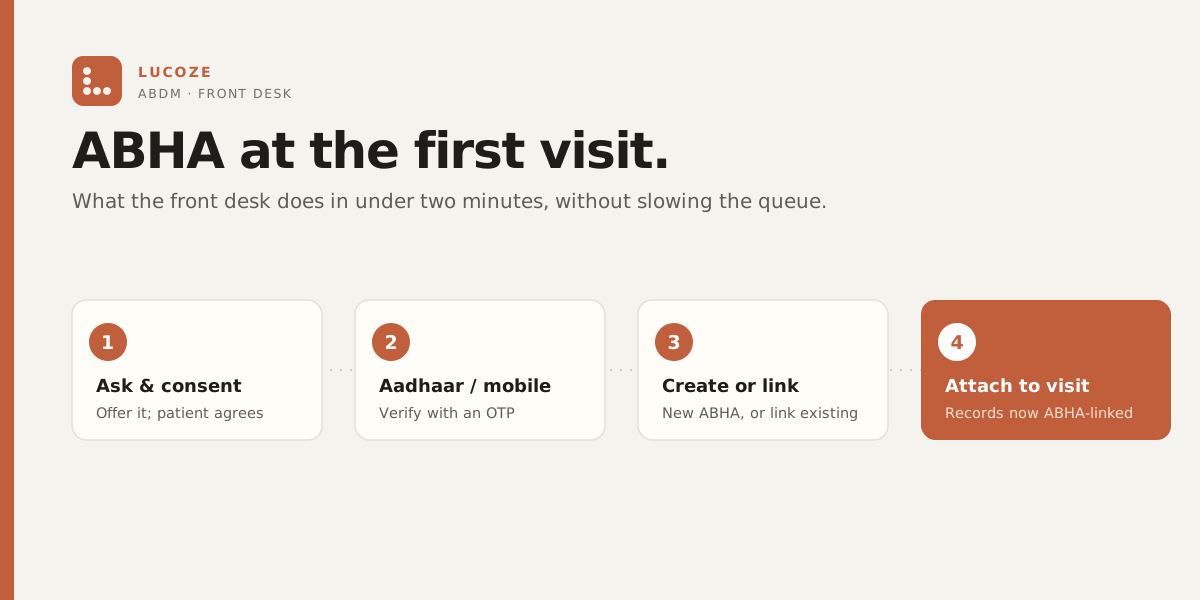
Screens differ between the ABHA app and the ABDM portal, so this is the shape of the flow, not a line-by-line script:
- Ask, and get a clear yes. If it’s a no, you stop here — no friction, no follow-up.
- Enter the patient’s mobile number and send the OTP to their phone.
- The patient reads out the OTP; you enter it to verify the number is really theirs.
- Fill in the basic details. If the patient opted to use Aadhaar, complete that step with them; if not, skip it.
- The ABHA is generated. Note the number against their record and let them know it’s done.
- If they consent to link this visit’s record, do that as part of registration in your software.
Start to finish it’s usually under a couple of minutes once the desk has done it a few times. It feels slower on day one and quick by day three. Don’t promise a stopwatch time to the patient — just say “a minute or two” and move on.
What if the patient says no?
Then it’s no, and that’s a perfectly normal outcome. ABHA is optional for the patient. Some will decline because they’re in a hurry, some because they’d rather not, some because they already have one. You register them exactly as you would have anyway and carry on. A patient who declines an ABHA gets the same care and the same record at your clinic — nothing about their visit changes.
If they already have an ABHA, you don’t create a second one — you can link the existing one with their consent. And “not now” is a valid answer too; you can always offer again on a later visit.
How does Lucoze fit?
Lucoze can create or link an ABHA right inside registration, so the front desk doesn’t juggle a separate app and a paper form. The consent step and the linking live in the same flow as the rest of the patient’s details, which is the point — one screen, one conversation, done. From there the patient’s patient records at your clinic sit ready to connect when they consent.
If you want the full background on the rails underneath all this — ABHA, HPR, HFR, and how consent actually works — read our ABDM & ABHA guide. And if you’d like to see the registration flow on your own front desk, Lucoze has a 14-day trial — no card, no pitch.
Sources
- ABHA — create and manage a health ID — the official ABHA portal.
- Ayushman Bharat Digital Mission (ABDM) — the National Health Authority’s official portal.
- National Health Authority (NHA) — the body that publishes the ABDM/ABHA standards.