How to register your clinic on HFR: step-by-step (2026)
Getting your clinic or hospital onto ABDM's Health Facility Registry: what you need, each screen in order, and the common rejections fixed.
This is a practical guide, not official NHA guidance. The portal at facility.abdm.gov.in is the source of truth for current requirements, fields, and any fees.
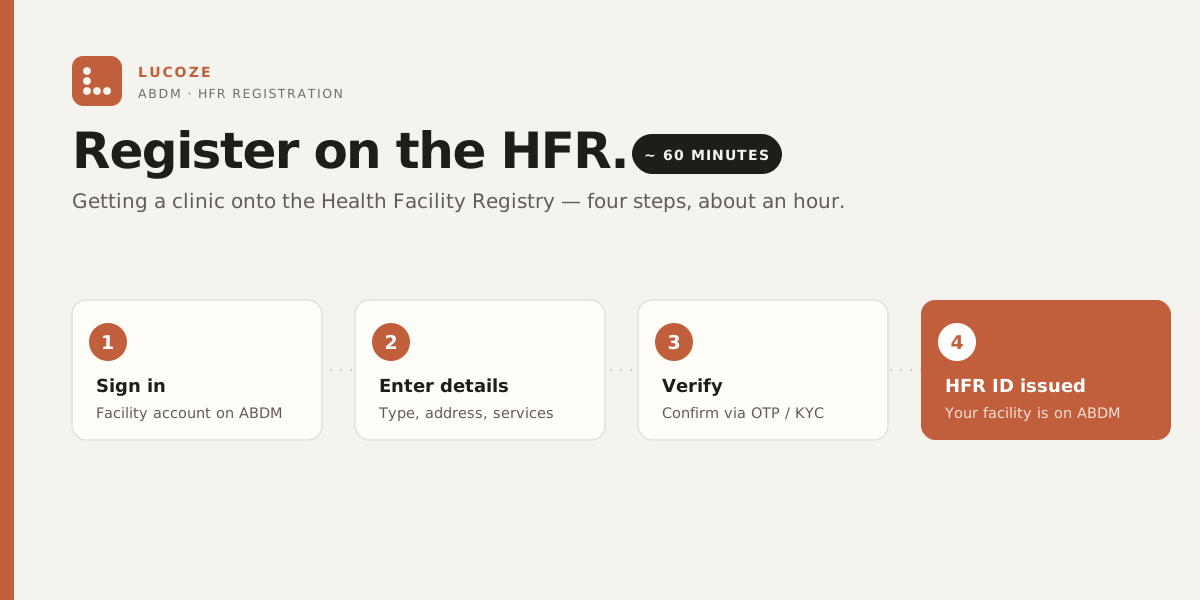
The short version: to register your clinic on the HFR, sign in at facility.abdm.gov.in with your mobile and an OTP, enter your facility’s details (type, address, specialties, licence numbers), and submit for verification. Once verified, the registry issues your HFR ID — usually about an hour of accurate paperwork plus a verification wait. The full steps, the documents to keep ready, and the common rejections are below.
What is HFR (and what isn’t it)?
The Health Facility Registry (HFR) is the public list of verified health facilities under the Ayushman Bharat Digital Mission (ABDM), run by the National Health Authority (NHA). Hospitals, clinics, diagnostic centres, pharmacies, labs — if it delivers care, it can have an HFR entry with a unique facility ID.
Think of it as the facility-side twin of ABHA. ABHA identifies the patient; HFR identifies the place. Once your clinic is registered and verified, it becomes discoverable within ABDM and can issue and verify ABHA-linked records on the standard rails.
Here is what it is not:
- It’s not a clinical licence. HFR does not replace your local registration, NABH, or state health authority approvals — it sits alongside them.
- It’s not a data upload. Registering a facility doesn’t hand your patient records to anyone. Records stay where they’re created.
- It’s not the same as HPR. HFR is the facility; the Healthcare Professional Registry (HPR) is the doctor. You typically want both.
Why should a clinic register on HFR?
Being on HFR is the difference between saying you’re “ABDM-ready” and actually being on the map. A verified facility ID is what lets your clinic issue records patients can pull into their ABHA, verify other providers, and participate in consent-based exchange. Without it, you’re outside the network looking in.
Concretely, it matters when:
- A patient asks you to link a visit or a report to their ABHA — you can only do that from a registered facility.
- State insurance and scheme workflows increasingly key off ABDM identifiers. Being registered keeps you inside the digital lane instead of the paper one.
- Referrals and cross-clinic exchange under ABDM need a verified sender and receiver. HFR is your identity on that network.
If your software vendor says you’re “ABDM-ready” but your facility isn’t in HFR, that readiness is theoretical. HFR is the row that makes it real.
What do you need before you start?
The exact document list varies by facility type; broadly, have ready:
- A mobile number you control (OTP-based sign-in), and ideally the owner’s or an authorised person’s details.
- Your facility’s legal and operational details — name, type (clinic, polyclinic, nursing home, diagnostic centre), ownership (private/public), and specialties offered.
- The full address with pincode, and location that matches your signboard reality — this is what gets verified.
- Any registration or licence numbers your facility already holds (local registration, GST if applicable, and similar) — the portal will tell you which are mandatory for your facility type.
- Basic infrastructure details — beds if any, key services, operating hours.
If you’re unsure which documents apply to your facility type, don’t guess — the portal branches the form by facility category and tells you what’s required. Check there.
How does HFR registration work, step by step?
The process lives entirely on the official portal. Rather than invent field names or step counts, here’s the arc to expect:
- Go to facility.abdm.gov.in and start registration for a new facility, signing in with your mobile via OTP. If you get stuck signing in, see the HFR login guide.
- Enter facility details — type, ownership, specialties, address, and the identifiers the form asks for.
- Submit for verification. HFR entries are verified, not self-asserted — that’s the whole point of the registry — so there’s a review step before your facility is fully live.
- Once verified, your facility gets its HFR ID and appears in the registry.
For the precise, current steps — button labels, mandatory fields, what triggers verification, and any fees — follow the portal itself. It’s the only source that stays up to date, and it’s the one that counts.
What happens after you’re registered?
Registration is the start, not the finish. A live HFR ID is only useful if your systems actually use it:
- Record it. Keep the HFR facility ID somewhere your team and your software can reach — it’s your identity on the network.
- Wire it into your EMR. The ID needs to flow into whatever issues ABHA-linked records. Registration alone doesn’t make records appear in a patient’s ABHA — your software has to do the linking.
- Register your doctors on HPR. HFR covers the facility; HPR covers the professionals. For full ABDM participation you generally want both — here’s HPR registration for doctors.
- Keep it accurate. If you move, add specialties, or change ownership, update the entry. A stale registry row misdirects patients and referrals.
What are the common snags?
- Picking the wrong facility type. The form branches on this, and it drives which documents you need. Get it right the first time or you’ll redo fields.
- Address that doesn’t match reality. Verification checks that the facility exists where you say it does. A sloppy or mismatched address is the most common reason things stall.
- Confusing HFR with HPR. Registering the facility does not register your doctors, and vice versa. Two registries, two jobs.
- Assuming registration = integration. Being in HFR doesn’t automatically issue ABHA-linked records. Your EMR has to support ABDM and use the facility ID. If your vendor can’t tell you how, that’s your answer.
- Trusting a screenshot from 2023. The portal evolves. Anything you read about exact steps — including this post — is a map, not the territory. Confirm on the portal.
HFR registration — quick answers
How long does HFR registration take? For a single clinic it is usually about an hour of accurate data entry on the portal, plus a verification wait before the facility goes fully live and is issued its HFR ID.
What do you need to register a clinic on HFR? A mobile number for OTP sign-in, your facility’s legal and operational details (name, type, ownership, specialties), the full address with pincode, and any registration or licence numbers you already hold. The portal branches by facility type and tells you which fields are mandatory.
Why is HFR registration commonly rejected? An address that doesn’t match reality — verification checks that the facility exists where you say it does, so a mismatched address is the most common reason registration stalls. Picking the wrong facility type is the next most common.
Sources
- Health Facility Registry (HFR) portal — where you actually register and the source of truth for current steps.
- Ayushman Bharat Digital Mission (ABDM) — the framework HFR is part of.
- National Health Authority (NHA) — the body that runs ABDM and publishes the registry standards.
Closing
HFR registration isn’t hard — it’s an afternoon of accurate paperwork on one portal, plus a verification wait. The part people underestimate is what comes after: making the facility ID actually do something inside your clinic’s software.
Lucoze is built to use that ID — issuing and verifying ABHA-linked records once your facility is registered — so the HFR entry isn’t just a certificate in a drawer. If you want to talk through where your clinic sits, reach out. No pitch attached.